Guides › Private lending
Real Estate Investor Loan Calculator: Estimate Rates and Cash to Close

Use a real estate investor loan calculator to estimate payments and cash to close. Compare DSCR and fix-and-flip financing options before funding your deal.
What if the payment that looks affordable is the number that makes a promising deal fall short? A real estate investor loan calculator can help you compare financing scenarios, but only when you enter realistic loan and property assumptions. A monthly payment alone won’t show the full cost of buying, holding, or improving an investment property.
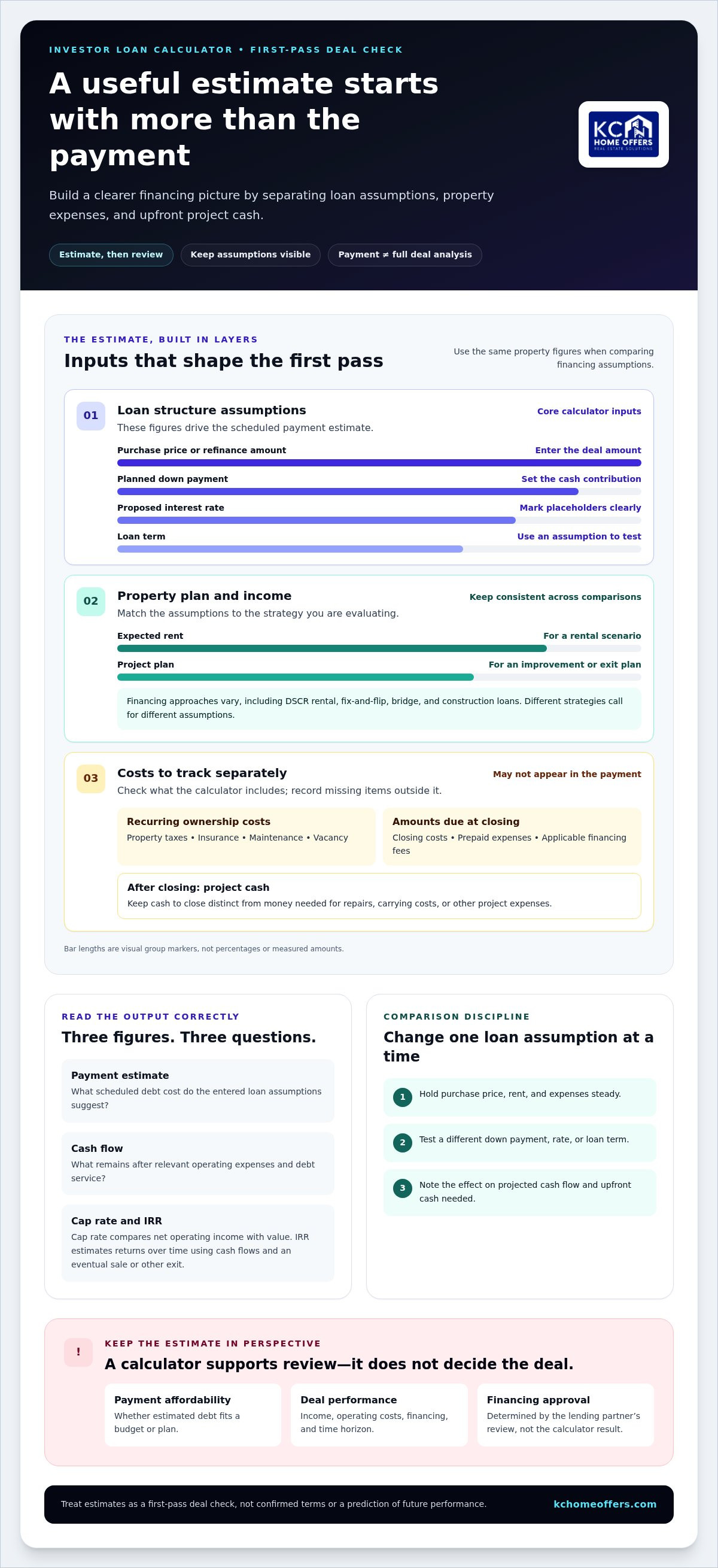
A quick estimate can help you screen a deal before spending time on a deeper review. Start with the purchase price, down payment, proposed interest rate, loan term, and expected rent or project plan. Then account separately for costs a basic payment estimate may omit, such as taxes, insurance, maintenance, vacancy, and costs due at closing.
This guide explains which figures to enter, what a calculator can and can’t tell you, and how to compare financing with a property’s investment potential. You’ll also see why a DSCR rental loan and a fix-and-flip loan call for different assumptions, and what to organize before discussing business-purpose financing. Treat the estimate as a first-pass deal check, not an approval or a promise of loan terms. KC Home Offers connects investors with lending partners, and financing is subject to their approval.
Key Takeaways
- Use a real estate investor loan calculator to test financing assumptions, then assess cash flow, cap rate, and IRR separately.
- Check which costs a calculator includes so its monthly estimate reflects the expenses relevant to your scenario.
- Compare financing options by changing one loan assumption at a time while keeping the property figures consistent.
- Estimate cash to close separately from ongoing payments, and distinguish both from the total cash needed for the project.
- Organize your purchase, rent, expense, and financing assumptions before discussing business-purpose financing. An estimate doesn’t determine approval or final loan terms.
Table of Contents
- What a Real Estate Investor Loan Calculator Can, and Cannot, Tell You
- How Investor Loan Calculators Turn Deal Inputs into Useful Estimates
- Compare Loan Scenarios Without Losing Sight of the Property
- A Step-by-Step Workflow for Using a Real Estate Investor Loan Calculator
- Turn Your Calculator Results into an Investor Financing Conversation
What a Real Estate Investor Loan Calculator Can, and Cannot, Tell You
A real estate investor loan calculator is a planning tool. Enter loan and property assumptions to estimate a payment, then adjust those assumptions to see how financing could affect a potential deal. It can help you screen a purchase, refinance, or alternative loan structure before a deeper review. It can’t predict a property’s future performance or tell you whether a lending partner will approve your request.
Keep financing estimates separate from rental-property measures. A loan payment estimates debt service under the inputs you provide. Cash flow considers income against operating expenses and debt service. Cap rate compares a property’s net operating income with its value, while IRR estimates investment returns over time based on cash flows and an eventual sale or other exit. These metrics answer different questions, so a payment result can’t stand in for them. The broader Real Estate Investing Overview also covers financing and investment strategies, which shape how a deal should be assessed.
Which investor decisions can the calculator support?
Use estimates to screen a possible purchase, consider a refinance, or compare financing assumptions for the same property. For example, hold the purchase price, rent, and expenses steady while testing a different down payment or loan term. If the change affects projected cash flow or the amount of cash needed upfront, you’ve identified a factor to examine further. The calculator supports comparisons; it doesn’t forecast outcomes or decide whether an investment fits your strategy.
Why a payment estimate is only one part of deal analysis
Some calculators show principal and interest only. Others may let you include property taxes and insurance for a broader monthly estimate. Neither view necessarily captures every ownership expense. Rental income and operating costs, such as maintenance or vacancy, also affect cash flow. A payment that appears manageable doesn’t establish that the property will perform well, and a single output can’t determine whether you should proceed.
Think of the estimate as one checkpoint, not the verdict. A property might appear affordable based on its scheduled debt payment yet leave little room for operating costs or changes in rental income. A higher payment may fit a different strategy, hold period, or exit plan. The financing structure and property plan determine which figures deserve close attention.
- Payment affordability asks whether the estimated debt obligation fits your budget or plan.
- Deal performance considers income, operating costs, financing, and the investment’s time horizon.
- Approval depends on a lending partner’s review, not on a calculator result.
Use the estimate to surface questions for a more detailed deal review: Which costs are included? How sensitive is cash flow to a change in loan assumptions? Does the projected return still align with your investment goals? Clear answers make a financing discussion more focused. An affordable payment is not proof of a strong deal.
How Investor Loan Calculators Turn Deal Inputs into Useful Estimates
A useful estimate starts with a clear set of assumptions. A real estate investor loan calculator typically uses the property price or refinance amount, planned down payment, interest rate, and loan term to estimate a scheduled payment. Depending on its fields, it may also include recurring costs such as property taxes and insurance. The result is only as useful as the figures entered, so keep estimates separate from confirmed loan terms.
Organize your inputs before calculating. For a purchase, start with the expected price and planned down payment. For a refinance, use the amount you expect to borrow. The purchase price minus the down payment can provide a preliminary loan amount, but the actual financing structure may use different figures. Investor financing also varies by strategy, including DSCR rental, fix-and-flip, bridge, and construction loans.
Which loan and property details should you enter?
Enter a proposed interest rate and loan term when you have a reasonable assumption to test. If you use a placeholder, label it clearly and don’t treat the result as a quote. Add taxes, insurance, or other recurring costs if the calculator provides fields, and record estimates it doesn’t accept separately. FDIC materials on real estate lending standards provide background on institutional lending, but a calculator can’t determine how a specific financing request will be evaluated.
For a fuller upfront-cash estimate, list the down payment and other expected amounts due at closing, such as closing costs, prepaid expenses, or applicable financing fees. Loan costs vary by structure, so use the figures available for the scenario rather than assuming a generic amount. Keep cash to close distinct from the money you may need after closing for repairs, carrying costs, or other project expenses. A payment calculator may not include any of these items.
What do payment, cash flow, and amortization results mean?
A payment estimate reflects the scheduled debt cost represented by the calculator’s inputs. It isn’t automatically the property’s full operating cost. Cash flow is the income remaining after relevant property operating expenses and debt service are accounted for. To estimate it, pair rent assumptions with expenses such as taxes, insurance, maintenance, vacancy, and management, whether or not the calculator has fields for each item.
Some calculators combine principal, interest, taxes, and insurance into a broader monthly figure. Check the output labels carefully: a payment including taxes and insurance still may not include vacancy or repairs. Don’t subtract expenses twice if they’re already built into a total, and don’t assume an omitted expense is zero.
An amortization schedule shows how scheduled payments are divided between interest and principal over time, as well as how the loan balance is projected to decline. Early payments on an amortizing loan may allocate a different share to interest than later payments. The schedule helps you understand the financing timeline; it doesn’t model every property cost or guarantee that a loan will follow those assumptions.
Build a companion worksheet for the inputs the calculator leaves out. List expected rental income, operating expenses, costs due at closing, and assumptions you’re still refining. This gives you a clearer view of how financing fits the property rather than relying on one monthly output. KC Home Offers connects investors with business-purpose financing through lending partners, subject to their approval. Explore investor financing options as you organize your deal assumptions.
Compare Loan Scenarios Without Losing Sight of the Property
A fair comparison changes one financing assumption at a time and holds the property assumptions steady. Keep the purchase price, expected rent, taxes, insurance, and operating expenses consistent. Then test how a different down payment, interest rate, or loan term affects estimated debt service, cash to close, and projected cash flow. If several inputs change at once, it becomes harder to see what drove the result.
The table below shows directional comparisons, not calculated offers or forecasts. “Lower” and “higher” are relative to the baseline scenario; actual results depend on the figures and loan structure entered.
| Scenario | What changes | Estimated payment | Estimated cash flow |
|---|---|---|---|
| Baseline | Starting financing assumptions | Reference point | Reference point |
| Larger down payment | Less borrowed, same property | Generally lower | May improve as debt service falls, with more cash invested upfront |
| Higher interest rate | Rate rises, other inputs held steady | Generally higher | May decline as debt service increases |
| Longer loan term | Repayment period extends | May be lower for an amortizing loan | May rise monthly, while total interest over time may also increase |
Payment affordability versus investment performance
Monthly debt service tells you what the modeled loan payment may require; it doesn’t show what remains after property operations. Cash flow accounts for income, relevant operating expenses, and debt service. Debt service coverage ratio, or DSCR, compares net operating income with debt service. A DSCR estimate is only as reliable as the rent, expense, and payment assumptions behind it.
When a DSCR or other financing scenario deserves a closer look
DSCR financing is relevant when evaluating rental property income against debt service. A fix-and-flip scenario should reflect the acquisition and renovation plan, while bridge financing may fit a shorter-term funding need and construction financing a build project. The right comparison depends on the plan for the property, not simply which row shows the smallest payment.
For a rental scenario, calculate DSCR consistently across options: use the same net operating income assumptions and compare them with each scenario’s debt service. If taxes, insurance, vacancy, or maintenance assumptions differ between scenarios, the comparison can mislead. Also note whether cash-flow estimates include all operating expenses or only selected costs. Write down each assumption beside the result so the figures remain useful during a deal review.
A DSCR loan investor guide can help clarify rental-financing considerations. Use the real estate investor loan calculator to test scenarios, then weigh payment, cash invested, property income, operating costs, and strategy together. A lower modeled payment isn’t automatically the stronger investment if it requires more cash upfront or doesn’t fit the intended hold period.
A Step-by-Step Workflow for Using a Real Estate Investor Loan Calculator
A reliable estimate starts before you enter anything. Gather the property, income, expense, and financing assumptions in one place, then follow a consistent sequence. This keeps the result traceable and makes it easier to spot which input needs a second look.
- Define the scenario. Decide whether you’re evaluating a purchase, refinance, rental hold, flip, or construction project. The strategy determines which inputs matter most and what the financing is intended to support.
- Record property figures. Note the expected purchase price or refinance amount, planned down payment, and expected rental income if applicable. Keep property income separate from financing and operating costs.
- Organize expenses. List expected taxes, insurance, maintenance, vacancy, and management costs. Use the calculator’s expense fields where available, and keep omitted costs in a separate worksheet.
- Estimate cash to close. Add the planned down payment and other expected amounts due at closing, using the cost assumptions available for the scenario. Keep post-closing project expenses separate.
- Enter financing assumptions. Add a proposed loan amount, interest rate, and term when you have assumptions to test. Label placeholders clearly; don’t present an unverified rate or term as a lending partner’s offer.
- Review and compare. Check what the payment output includes, then record the estimated payment, cash to close, and cash flow alongside the assumptions. Change one financing variable at a time while holding property, rent, and expense figures steady.
- Run a cautious case. Test lower rental income or higher operating expenses to see how the estimate responds. This stress test doesn’t predict what will happen, but it can show whether the deal depends on especially favorable assumptions.
Prepare consistent figures before calculating
Use the same rent and operating-cost assumptions for each financing scenario so the comparison stays fair. Separate recurring property costs from loan inputs, and note which figures come from current property information and which are estimates or still uncertain. A real estate investor loan calculator can only work with the values entered, so clear labels help prevent a rough placeholder from being mistaken for a dependable figure.
Review the output and test a more cautious scenario
Read the result labels closely. A broader payment may include principal, interest, taxes, and insurance, while another output may show only some of those components. Confirm which costs are represented before calculating cash flow, and avoid counting the same expense twice. Then adjust income or expenses for a cautious case and record both outputs with their inputs.
Before relying on an estimate, review the assumptions that have the greatest effect on the result. Investors organizing a scenario for business-purpose financing can discuss investor financing assumptions through KC Home Offers, which connects investors with lending partners. Loan requests remain subject to the lending partner’s approval.
- Purchase price or refinance amount and planned down payment
- Expected rent and the basis for that estimate
- Interest rate, loan term, and loan amount assumptions
- Taxes, insurance, vacancy, maintenance, and management costs
- Expected costs due at closing and project expenses after closing
- Which costs the calculator includes, and which remain outside its output
Turn Your Calculator Results into an Investor Financing Conversation
A calculator result is most useful when you can explain how you arrived at it. Treat it as a preliminary snapshot, not an offer or a lending decision. The estimate reflects the assumptions you entered; lending partners review the financing request and determine whether to approve it and what terms may apply.
Before discussing a deal, prepare a concise summary of the property, your strategy, and the financing scenario you modeled. This gives the conversation a practical starting point and makes it easier to identify which figures need more support or refinement.
What to have ready for a financing discussion
Bring the purchase or project assumptions, your intended property strategy, and estimated rental income if the plan involves a rental. Include the loan amount, down payment, interest rate, and term used in your calculation. Separate documented figures from estimates, and flag any placeholders so they aren’t mistaken for confirmed terms or property facts.
- Property plan: Explain whether you’re acquiring a rental, renovating a property for resale, refinancing, or building.
- Deal figures: Summarize the expected purchase price or project costs, planned cash contribution, and loan amount being evaluated.
- Income and expenses: For a rental, provide your rent estimate and the operating costs used in the analysis.
- Calculation assumptions: Note the rate, term, payment estimate, and any costs the calculator left out.
- Supporting information: Identify which numbers are based on available documentation and which remain preliminary.
This preparation helps keep the conversation focused. If two scenarios produce different results, bring both and specify which single assumption changed. That makes the comparison easier to interpret without presenting a calculator output as a prediction or commitment.
Match the financing conversation to the investment strategy
Rental-property investors can frame a DSCR financing discussion around projected property income and debt service. Renovation projects have different considerations: a fix-and-flip plan centers on the property and the work before resale, while construction financing relates to a build project. These strategies shouldn’t be treated as interchangeable versions of a long-term rental loan. For renovation-specific considerations, review the fix-and-flip funding guide.
KC Home Offers connects real estate investors with business-purpose financing through lending partners, including DSCR, fix-and-flip, bridge, and construction loan options. Organized figures can help establish a focused starting point, but calculator results don’t guarantee approval, rates, or terms. Any financing remains subject to the lending partner’s approval.
If you’ve outlined your property strategy and calculator assumptions, start an investor financing conversation with KC Home Offers.
Use Your Estimate as a Starting Point for the Next Decision
A deal rarely stays exactly as first modeled. As new information comes in, update your assumptions and keep an earlier version for comparison. That record helps you see whether a change in the property, project plan, or expected income shifts the decision, rather than relying on memory or a single estimate.
Use your real estate investor loan calculator as a working tool, not a final verdict. If the numbers change, note what changed and why. You’ll have a clearer basis for deciding whether to refine the deal, revisit the financing structure, or move forward with a more detailed review.
KC Home Offers connects investors with lending partners for DSCR, fix-and-flip, bridge, and construction loans. Financing is subject to the lending partner’s approval. Explore investor financing options with KC Home Offers and take your next step with a more organized view of the deal.
Frequently Asked Questions
How accurate is a real estate investor loan calculator?
It can calculate an estimate from the inputs you provide, but it can’t make uncertain inputs accurate. If your interest rate, insurance estimate, or rent projection is a placeholder, the result is a planning figure, not a precise forecast. Rerun the estimate when you have updated property information or financing assumptions, and note which version uses the most current figures.
Can a loan calculator estimate cash flow as well as monthly payments?
Some calculators can estimate cash flow if they include fields for rental income and operating expenses. Others focus on debt payments, so you’ll need to calculate cash flow separately using your income and expense assumptions. Check what the tool includes before relying on its result. A calculator that omits an expense can make projected cash flow look stronger than your full property analysis supports.
What is the difference between a loan payment estimate and DSCR?
A loan payment estimate focuses on scheduled debt costs under the financing inputs. DSCR compares a property’s net operating income with its debt service, so it relates income to the obligation rather than showing the payment alone. If two properties have similar loan payments but different operating income, their DSCR estimates can differ. Use consistent income and expense definitions when comparing those ratios.
Does a real estate investor loan calculator include vacancy and repairs?
Not necessarily. A calculator may provide fields for taxes or insurance but leave vacancy and repairs out of its payment output. Check the tool’s labels and instructions. If it has no suitable fields, estimate those costs separately in your property worksheet. You can then see how a period without rental income or an unexpected repair could affect the cash available after property expenses and debt service.
Can I use the same calculator to compare rental and fix-and-flip financing?
You can use one tool to compare basic loan assumptions if it lets you enter the relevant amounts, rates, and terms. But a rental hold and a fix-and-flip project have different income timelines and cost structures. A rental analysis centers on ongoing income and expenses; a flip analysis needs to reflect renovation costs and the planned resale. Don’t treat one calculator output as a complete analysis of both strategies.
Does a calculator result mean I am approved for an investment loan?
No. A calculator provides an estimate based on user-entered assumptions; it doesn’t submit an application or represent a lending partner’s decision. Approval, rates, and terms aren’t established by the output. KC Home Offers connects investors with business-purpose financing through lending partners, and any loan remains subject to the lending partner’s approval. Use your estimate to organize a financing discussion, not as evidence of approval.
What information should I gather before using an investor loan calculator?
Gather the expected purchase price or refinance amount, planned down payment, estimated loan amount, and any proposed rate or term you want to test. For a rental, also prepare expected rent and property expenses; for a project, organize the relevant renovation or construction assumptions. Include estimated costs due at closing if you’re calculating cash to close. Mark each figure as documented or estimated so you can update the calculation as new information becomes available.
Frequently asked
Which investor decisions can the calculator support?
Use estimates to screen a possible purchase, consider a refinance, or compare financing assumptions for the same property. For example, hold the purchase price, rent, and expenses steady while testing a different down payment or loan term. If the change affects projected cash flow or the amount of cash needed upfront, you’ve identified a factor to examine further. The calculator supports comparisons; it doesn’t forecast outcomes or decide whether an investment fits your strategy.
Which loan and property details should you enter?
Enter a proposed interest rate and loan term when you have a reasonable assumption to test. If you use a placeholder, label it clearly and don’t treat the result as a quote. Add taxes, insurance, or other recurring costs if the calculator provides fields, and record estimates it doesn’t accept separately. FDIC materials on real estate lending standards provide background on institutional lending, but a calculator can’t determine how a specific financing request will be evaluated. For a fuller upfront-cash estimate, list the down payment and other expected amounts due at closing, such as closing costs, prepaid expenses, or applicable financing fees. Loan costs vary by structure, so use the figures available for the scenario rather than assuming a generic amount. Keep cash to close distinct from the money you may need after closing for repairs, carrying costs, or other project expenses. A payment calculator may not include any of these items.
What do payment, cash flow, and amortization results mean?
A payment estimate reflects the scheduled debt cost represented by the calculator’s inputs. It isn’t automatically the property’s full operating cost. Cash flow is the income remaining after relevant property operating expenses and debt service are accounted for. To estimate it, pair rent assumptions with expenses such as taxes, insurance, maintenance, vacancy, and management, whether or not the calculator has fields for each item. Some calculators combine principal, interest, taxes, and insurance into a broader monthly figure. Check the output labels carefully: a payment including taxes and insurance still may not include vacancy or repairs. Don’t subtract expenses twice if they’re already built into a total, and don’t assume an omitted expense is zero. An amortization schedule shows how scheduled payments are divided between interest and principal over time, as well as how the loan balance is projected to decline. Early payments on an amortizing loan may allocate a different share to interest than later payments. The schedule helps you understand the financing timeline; it doesn’t model every property cost or guarantee that a loan will follow those assumptions. Build a companion worksheet for the inputs the calculator leaves out. List expected rental income, operating expenses, costs due at closing, and assumptions you’re still refining. This gives you a clearer view of how financing fits the property rather than relying on one monthly output. KC Home Offers connects investors with business-purpose financing through lending partners, subject to their approval. Explore investor financing options as you organize your deal assumptions. A fair comparison changes one financing assumption at a time and holds the property assumptions steady. Keep the purchase price, expected rent, taxes, insurance, and operating expenses consistent. Then test how a different down payment, interest rate, or loan term affects estimated debt service, cash to close, and projected cash flow. If several inputs change at once, it becomes harder to see what drove the result. The table below shows directional comparisons, not calculated offers or forecasts. “Lower” and “higher” are relative to the baseline scenario; actual results depend on the figures and loan structure entered.
How accurate is a real estate investor loan calculator?
It can calculate an estimate from the inputs you provide, but it can’t make uncertain inputs accurate. If your interest rate, insurance estimate, or rent projection is a placeholder, the result is a planning figure, not a precise forecast. Rerun the estimate when you have updated property information or financing assumptions, and note which version uses the most current figures.
Can a loan calculator estimate cash flow as well as monthly payments?
Some calculators can estimate cash flow if they include fields for rental income and operating expenses. Others focus on debt payments, so you’ll need to calculate cash flow separately using your income and expense assumptions. Check what the tool includes before relying on its result. A calculator that omits an expense can make projected cash flow look stronger than your full property analysis supports.
What is the difference between a loan payment estimate and DSCR?
A loan payment estimate focuses on scheduled debt costs under the financing inputs. DSCR compares a property’s net operating income with its debt service, so it relates income to the obligation rather than showing the payment alone. If two properties have similar loan payments but different operating income, their DSCR estimates can differ. Use consistent income and expense definitions when comparing those ratios.
Does a real estate investor loan calculator include vacancy and repairs?
Not necessarily. A calculator may provide fields for taxes or insurance but leave vacancy and repairs out of its payment output. Check the tool’s labels and instructions. If it has no suitable fields, estimate those costs separately in your property worksheet. You can then see how a period without rental income or an unexpected repair could affect the cash available after property expenses and debt service.
Can I use the same calculator to compare rental and fix-and-flip financing?
You can use one tool to compare basic loan assumptions if it lets you enter the relevant amounts, rates, and terms. But a rental hold and a fix-and-flip project have different income timelines and cost structures. A rental analysis centers on ongoing income and expenses; a flip analysis needs to reflect renovation costs and the planned resale. Don’t treat one calculator output as a complete analysis of both strategies.
Does a calculator result mean I am approved for an investment loan?
No. A calculator provides an estimate based on user-entered assumptions; it doesn’t submit an application or represent a lending partner’s decision. Approval, rates, and terms aren’t established by the output. KC Home Offers connects investors with business-purpose financing through lending partners, and any loan remains subject to the lending partner’s approval. Use your estimate to organize a financing discussion, not as evidence of approval.
What information should I gather before using an investor loan calculator?
Gather the expected purchase price or refinance amount, planned down payment, estimated loan amount, and any proposed rate or term you want to test. For a rental, also prepare expected rent and property expenses; for a project, organize the relevant renovation or construction assumptions. Include estimated costs due at closing if you’re calculating cash to close. Mark each figure as documented or estimated so you can update the calculation as new information becomes available.
Need financing on a deal like this?
DSCR, fix & flip and new construction loans, underwritten on the deal rather than your tax returns. Soft credit pull only.
Apply in 5 minutes