Guides › Private lending
New Construction Loan Calculator: Estimate Payments and Total Costs

Use our new construction loan calculator guide to estimate project costs, understand draw schedules, and prepare details for investor lending partner review.
A new construction loan calculator can help organize project costs and funding assumptions, but it can’t approve a project or predict a lending partner’s final terms. A construction estimate can look solid on paper and still miss how funding is released.
It’s understandable to wonder which costs belong in the estimate, how loan-to-cost differs from loan-to-value, and why draw-based funding affects cash flow. The result is only as useful as the assumptions behind it. Enter a realistic project budget, land value, borrower equity, estimated loan amount, rate, term, and anticipated draw schedule. Include relevant costs such as site work, construction, and design or permit expenses so the estimate reflects more than the build itself.
This guide explains how to read a financing estimate, identify the inputs that can shift it, and prepare project details for a lending discussion. KC Home Offers connects investors with lending partners for business-purpose construction financing. A calculator can help frame that discussion, but loans are subject to the lending partner’s approval, and actual terms may differ from an estimate.
Key Takeaways
- Use a new construction loan calculator to organize property, budget, borrower, and funding assumptions into a useful project snapshot.
- Separate land acquisition costs from construction expenses where the calculator allows, so your estimate reflects the project’s actual cost structure.
- Compare loan-to-cost and loan-to-value carefully: each measures financing against a different project figure.
- Test base, higher-cost, and delayed-project scenarios to see how budget, completed value, and draw timing may affect estimated funding.
- Prepare your project scope, land status, budget, timeline, and estimated completed value for a financing discussion. Final terms depend on the lending partner’s approval.
Table of Contents
- What a New Construction Loan Calculator Estimates
- New Construction Loan Calculator Inputs: Build a Useful Project Snapshot
- How to Use a New Construction Loan Calculator Step by Step
- How to Interpret Calculator Results Without Overestimating Funding
- From Calculator Estimate to Construction Financing With KC Home Offers
What a New Construction Loan Calculator Estimates
A new construction loan calculator turns project details and financing assumptions into a preliminary estimate. It can help you see how a proposed budget, anticipated property value, and funding approach might shape a financing scenario. It’s a planning tool, not a lending decision.
A construction loan calculator estimates potential project financing from the assumptions entered; it does not promise that funds will be available. The estimate is only as useful as the information behind it. If the project scope changes, costs are missing, or the estimated completed value is optimistic, the output can shift or give a misleading picture of the deal.
Start by understanding what the calculator counts. Depending on its fields, the estimate may be affected by:
- Project scope: The planned build, including its size, specifications, and work required to complete it.
- Costs included: Land acquisition, construction, and other project expenses, if the tool provides fields for them. Follow the calculator’s categories and avoid entering the same cost twice.
- Value assumptions: The projected value of the completed property can affect a scenario that considers collateral value.
- Funding structure: The assumed loan amount, rate, term, and timing of fund draws can influence estimated payments or cash needs.
These inputs don’t affect every calculator in the same way. Some tools estimate a possible loan amount; others focus on payments or compare project funding scenarios. Check the labels and assumptions behind each result before using it to assess feasibility.
What Does a Construction Loan Calculator Show?
A calculator may display an estimated loan amount, a projected payment, or a comparison between the project budget and assumed financing. Those figures are outputs of a model, not confirmed funding. For example, a payment estimate may rely on a rate and funding schedule you entered, while another tool may not account for staged draws at all. The fields determine what the result represents.
How Is a Construction Loan Estimate Different From a Final Loan Offer?
A preliminary calculation applies general assumptions to the numbers you supply. A lending partner’s review is project-specific: it considers the borrower, proposed work, budget, and collateral, then determines whether to make an offer and on what terms. A calculator cannot assess documents or make that decision. Loans connected through KC Home Offers are subject to the lending partner’s approval.
Use the estimate to identify gaps and prepare sharper questions, not to commit to a purchase or construction budget on its own. If changing the project scope or completed-value assumption materially changes the result, examine the underlying numbers before moving the deal forward.
New Construction Loan Calculator Inputs: Build a Useful Project Snapshot
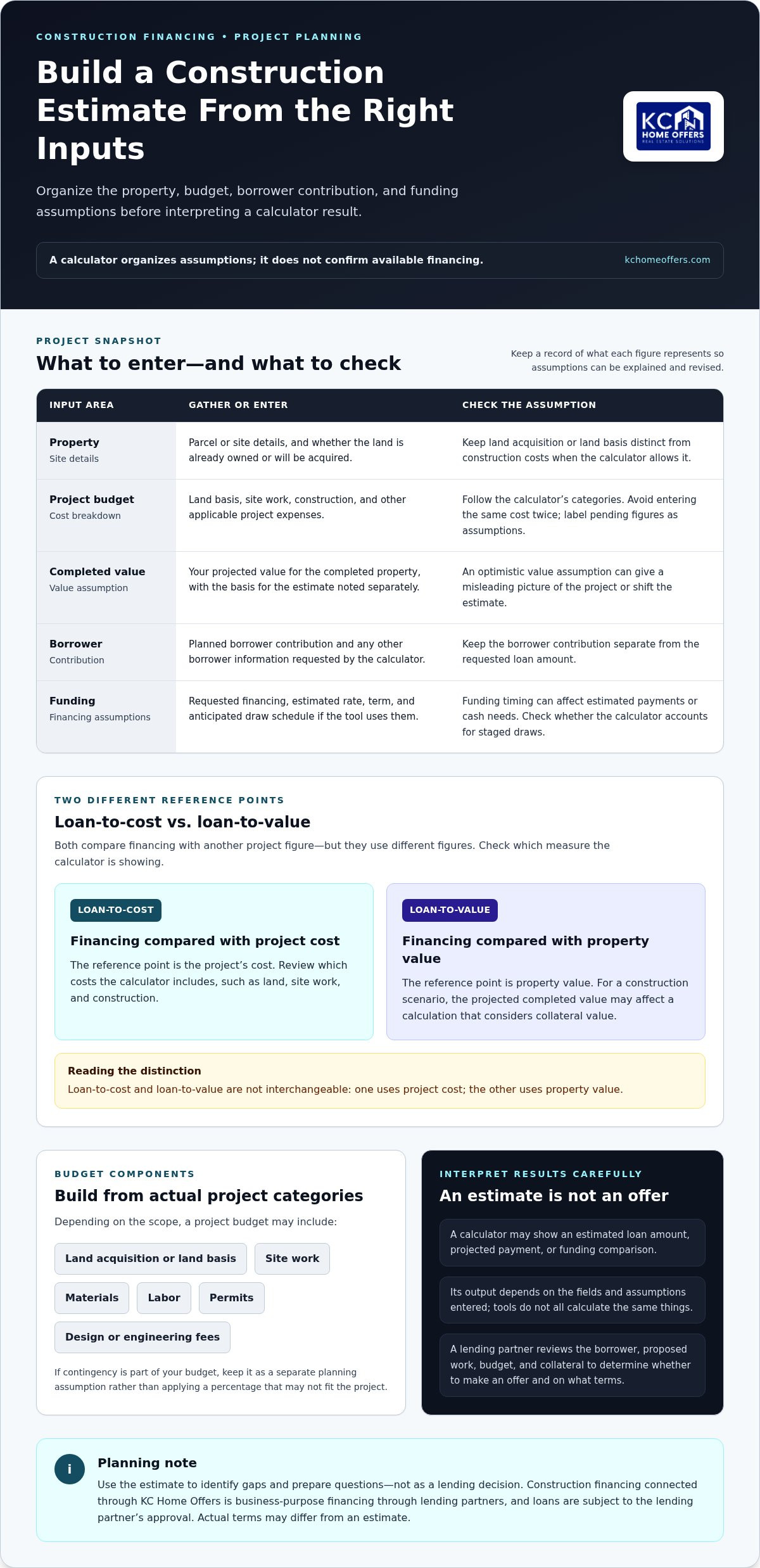
A useful estimate starts with a clear snapshot, not a guess at the largest loan you might request. Before using a new construction loan calculator, gather the project’s property details, cost breakdown, estimated completed value, borrower contribution, and financing assumptions. If a field doesn’t match your budget categories, don’t force unrelated costs into it.
Organize your information in these groups:
- Property: Parcel or site details, and whether you already own the land or plan to acquire it.
- Project budget: Land basis, site work, construction, and other applicable project expenses.
- Estimated value: Your projected value for the completed property, with the basis for the estimate noted separately.
- Borrower: The planned contribution and any other borrower information the calculator requests.
- Funding: Requested financing and any rate, term, or draw assumptions the tool uses to estimate costs or payments.
Calculator fields vary. Keep a record of what each number represents so you can explain the assumptions and revise them without losing track of the original estimate.
Which Project Costs Should You Gather?
Build the budget from the project’s actual categories. Depending on the scope, these may include land acquisition or land basis, site work, materials, labor, permits, and professional fees such as design or engineering. If contingency is part of your budget, keep it as a separate planning assumption rather than applying a percentage that may not fit the project.
Keep land acquisition separate from construction costs when the calculator provides distinct fields. That makes it easier to see what the estimate counts as project cost and helps prevent double-counting land already included elsewhere. If a contractor bid, permit estimate, or professional fee is still pending, label the figure as an assumption, not a confirmed cost. The Consumer Financial Protection Bureau’s construction loan explanation offers broader context on how this financing works.
Which Property and Financing Assumptions Matter?
Record the property or site details the calculator requests, then enter a projected completed value that reflects your current project analysis. Add the borrower’s planned contribution and requested financing as separate figures. This distinction matters: the requested loan is not automatically the same as the amount a lending partner may make available.
Loan-to-cost (LTC) compares financing with eligible project costs. Loan-to-value (LTV) compares financing with a relevant property value, which may be based on the project’s completed value depending on the calculation. The measures use different denominators, so don’t treat one as a substitute for the other. Confirm which cost and value figures the calculator uses before interpreting its result.
For broader context on the financing process, review KC Home Offers’ new construction financing guide. Investors organizing a ground-up project can also explore construction financing connections through KC Home Offers. Financing is arranged through lending partners, and loans are subject to the lending partner’s approval.
How to Use a New Construction Loan Calculator Step by Step
Run an estimate in a consistent order. This helps you spot missing information and understand which assumptions are driving the result, rather than treating a single output as a financing decision.
- Gather project facts. Pull together the current scope, cost categories, land status, estimated completed value, borrower contribution, and financing details the calculator requests. Mark figures that are still estimates.
- Enter assumptions carefully. Match each figure to the calculator’s field definitions. Keep land and construction expenses separate when the tool allows it, and avoid counting the same cost in more than one category.
- Review what the output measures. Check whether it shows an estimated loan amount, a payment scenario, or another comparison. Note the rate, term, cost basis, value basis, and funding assumptions behind the result.
- Test alternatives. Change one input at a time, such as a cost estimate, completed value, or funding timeline. Record how the result moves before testing another variable. That makes the impact of each assumption easier to see.
A calculator result is an estimate, not an approval. It applies entered assumptions without completing a lending partner’s review of the project and borrower.
Calculate a Preliminary Loan-to-Cost Scenario
For a basic loan-to-cost (LTC) view, divide the estimated financing amount by the eligible total project cost. If the requested amount is the financing figure, use that consistently and label the result as a preliminary scenario. Compare the same proposed financing amount against the budget total the calculator defines as eligible, rather than silently adding or removing cost categories. Eligible costs and calculation methods can vary, so don’t treat an assumed maximum ratio as a universal lending standard.
Compare the Estimate With Project Value and Funding Timing
Loan-to-value (LTV) is a separate view: it compares financing with a relevant property value, which may use the projected completed value in a ground-up scenario. Keep that value assumption distinct from total project cost. A project can look different under an LTC comparison than under an LTV comparison because each uses a different basis.
Funding timing matters, too. Construction financing may release funds in stages as work progresses, rather than provide the full amount at the outset. If a calculator asks for draw timing, enter a schedule that reflects your project plan. If it doesn’t, its payment estimate may not capture when funds are expected to be used. A faster or slower build can change the timing assumptions, so keep the schedule visible alongside the result.
Use the estimate to prepare a clear project summary for a financing discussion, not as a commitment to proceed. KC Home Offers connects real estate investors with lending partners for business-purpose construction financing. You can explore construction financing connections as you organize the project; loans are subject to the lending partner’s approval.
How to Interpret Calculator Results Without Overestimating Funding
Treat the calculator’s output as one planning scenario, not a spending limit. The estimate may not show how much cash you’ll need to contribute, when funds will be available, or which costs a lending partner will include. A conservative review helps surface gaps before they affect project decisions.
Compare scenarios by changing assumptions deliberately. Keep the project scope consistent unless scope is the variable you’re testing, and record what changed each time.
| Scenario | Assumptions to test | What to review |
|---|---|---|
| Base case | Current scope, budget estimates, completed-value assumption, and expected funding timeline. | Whether the projected financing and available borrower contribution appear to cover planned costs. |
| Higher-cost case | Increase uncertain or incomplete cost estimates using project-specific information, not an arbitrary percentage. | Whether added costs create a cash gap or change the financing scenario. |
| Delayed-project case | Extend the anticipated schedule and adjust draw timing if the calculator allows it. | How a longer timeline could affect interest expense, cash needs, and the project plan. |
These comparisons don’t predict a lending partner’s decision. They show how sensitive your estimate is to the inputs you control or still need to verify.
Which Assumptions Can Change the Estimate?
Land basis and eligible-cost definitions affect the budget used in a loan-to-cost calculation. Project scope can change the cost picture, while projected completed value may affect a separate loan-to-value view. Draw timing also matters because construction funds can be released in stages. If the build takes longer or costs more than planned, cash needs and project planning may change, but no single input guarantees a particular financing outcome.
What Should You Do if the Estimate Falls Short?
First, locate the gap. Check whether it comes from an incomplete budget, a cost category the tool treats differently, a value assumption, or a mismatch between expected draw timing and cash needs. Then revisit the scope, confirm or update available cost estimates, and make contingency assumptions explicit. Don’t quietly adjust the completed value just to make the result appear workable.
Also separate the calculator’s estimated loan amount or payment from cash-to-close, interest, fees, and other lender-specific terms. A calculator may not include them, or its fields may use assumptions that differ from a lending partner’s. Keep unresolved costs and value questions visible in your project notes.
A well-prepared estimate can make a financing discussion more focused, but it can’t replace project and borrower review. KC Home Offers connects investors with lending partners for business-purpose construction financing, subject to the lending partner’s approval. Discuss a construction financing scenario once you’ve organized your assumptions.
From Calculator Estimate to Construction Financing With KC Home Offers
A calculator becomes more useful when its assumptions are organized into a project snapshot you can explain. Bring the figures behind the estimate, not just the final result. That gives a financing discussion a clearer starting point and makes it easier to identify what still needs refinement.
What to Prepare Before Discussing a Project
Assemble a current construction plan, property details, working budget, land status, anticipated timeline, and estimated completed value. Note the amount of financing you think the project may require and when funds may be needed. Separate confirmed figures, such as received bids, from estimates that still depend on planning or updated pricing. Clear labels help distinguish project facts from assumptions.
Use a short project summary to make the information easy to review:
- Scope: Describe the planned build and any major work that could affect cost or timing.
- Budget: Group costs by category and identify items that remain preliminary.
- Property and land: State whether the land is already owned or still part of the acquisition plan.
- Timeline and funding: Outline the expected project schedule, anticipated draw needs, and requested financing.
- Value: Record the projected completed value and the assumptions behind it.
Keep the calculator output beside this summary, along with the assumptions used for the estimate. If the project budget or schedule changes, update the relevant figures rather than relying on an older scenario. This creates a practical basis for discussing the deal and helps keep unanswered questions visible.
Explore Financing for a Ground-Up Project
KC Home Offers connects real estate investors with lending partners for business-purpose construction financing, including ground-up projects. KC Home Offers is not the lender. A calculator can help organize project information for that conversation, but it doesn’t establish whether financing will be available or set final terms. The lending partner reviews the project and borrower, and loans are subject to that partner’s approval.
Before moving forward, note unresolved budget items, changes to the build scope, uncertainty around land costs, or timing assumptions that could affect how much funding is needed and when. You don’t need to present an estimate as certain. Distinguishing confirmed details from open questions gives the discussion a stronger foundation.
If you’ve assembled the project snapshot, take the next step and discuss your construction financing needs with KC Home Offers. Bring the budget, scope, land status, timeline, and value assumptions together so the financing conversation can focus on the project’s actual requirements.
Turn Your Estimate Into a Clear Next Step
Use your estimate as a decision checkpoint. Before committing to a site, scope, or schedule, consider whether the project still makes sense if key assumptions shift. A new construction loan calculator can help frame that question, but your next move should be guided by a realistic view of the project’s uncertainties, not a single projected figure.
Keep your working numbers organized as the plan develops. Update them when you receive firmer cost information or revise the timeline, and note what changed. That way, each financing discussion starts with a current picture of the opportunity and the questions that still need answers.
KC Home Offers connects real estate investors with lending partners for business-purpose construction financing. Financing availability and terms depend on the lending partner’s review, and loans are subject to its approval. If you’re ready to discuss your project, discuss your construction financing needs. A thoughtful estimate is a practical starting point for moving forward with clarity.
Frequently Asked Questions
What does a new construction loan calculator calculate?
It estimates a possible financing scenario using the project and loan assumptions you enter. Depending on the tool, you may be able to include land, eligible project costs, projected completed value, or requested financing. For example, changing whether land is included in the budget can alter the scenario shown. Use the output to organize early planning, not as a loan offer. A lending partner must review the borrower and project before deciding whether financing is available and on what terms.
How do you calculate a construction loan amount?
There isn’t one calculation used by every tool. A calculator may compare requested financing with eligible project costs or a relevant property value. Loan-to-cost uses eligible costs as its comparison basis, while loan-to-value uses property value. For a useful comparison, note which figures the calculator includes in each calculation and keep those inputs consistent when testing scenarios. Lending partners may define inputs differently, so neither ratio by itself establishes final approval or financing terms.
What costs should I include in a construction loan calculator?
Start with the current project budget. Depending on the build, relevant categories may include land, site work, labor, materials, professional fees, and other construction expenses. If the tool separates categories, enter each cost in the matching field rather than combining unrelated items. Mark costs based on preliminary estimates as assumptions, especially if bids or planning details are still outstanding. This makes it easier to identify which parts of the estimate need updating before you rely on it.
Can a construction loan calculator tell me whether I will be approved?
No. A calculator processes the information entered, but it doesn’t make an underwriting decision or review project documentation. The lending partner evaluates the borrower, project, collateral, and applicable requirements before deciding whether financing is available and on what terms. KC Home Offers connects investors with lending partners for business-purpose loans, including construction financing. Any loan is subject to the lending partner’s approval, so treat a calculator result as preparation rather than confirmation.
How does a construction loan draw schedule affect the estimate?
A draw schedule lays out when construction funds may be released as work progresses. That timing can affect when you need other cash available for project expenses. For example, if a cost comes due before a planned draw, the estimate may not show the temporary funding gap. Some calculators don’t model draws or release conditions, so review what the tool includes and keep the anticipated funding sequence as a separate planning item.
What happens if construction costs increase after I use the calculator?
Update the budget and rerun the scenario using the revised project costs. Compare the new result with the earlier estimate, and identify which categories changed, such as site work, materials, or labor. If the updated budget creates a shortfall, revisit the scope and cash plan before relying on the original numbers. Don’t assume that more financing will automatically be available; the lending partner must review any changed project and determine whether financing can be adjusted.
How accurate is a new construction loan calculator?
Its usefulness depends on the accuracy of your inputs and how closely its assumptions match the method used in a lending review. An early estimate may rely on preliminary cost figures, a projected completed value, or an assumed timeline. If you’re comparing options, keep a record of those assumptions so you can see why results differ. Replace estimates with current project information as it becomes available, and don’t treat the output as a promise of financing.
Frequently asked
What Does a Construction Loan Calculator Show?
A calculator may display an estimated loan amount, a projected payment, or a comparison between the project budget and assumed financing. Those figures are outputs of a model, not confirmed funding. For example, a payment estimate may rely on a rate and funding schedule you entered, while another tool may not account for staged draws at all. The fields determine what the result represents.
How Is a Construction Loan Estimate Different From a Final Loan Offer?
A preliminary calculation applies general assumptions to the numbers you supply. A lending partner’s review is project-specific: it considers the borrower, proposed work, budget, and collateral, then determines whether to make an offer and on what terms. A calculator cannot assess documents or make that decision. Loans connected through KC Home Offers are subject to the lending partner’s approval. Use the estimate to identify gaps and prepare sharper questions, not to commit to a purchase or construction budget on its own. If changing the project scope or completed-value assumption materially changes the result, examine the underlying numbers before moving the deal forward. A useful estimate starts with a clear snapshot, not a guess at the largest loan you might request. Before using a new construction loan calculator, gather the project’s property details, cost breakdown, estimated completed value, borrower contribution, and financing assumptions. If a field doesn’t match your budget categories, don’t force unrelated costs into it. Organize your information in these groups: Calculator fields vary. Keep a record of what each number represents so you can explain the assumptions and revise them without losing track of the original estimate.
Which Project Costs Should You Gather?
Build the budget from the project’s actual categories. Depending on the scope, these may include land acquisition or land basis, site work, materials, labor, permits, and professional fees such as design or engineering. If contingency is part of your budget, keep it as a separate planning assumption rather than applying a percentage that may not fit the project. Keep land acquisition separate from construction costs when the calculator provides distinct fields. That makes it easier to see what the estimate counts as project cost and helps prevent double-counting land already included elsewhere. If a contractor bid, permit estimate, or professional fee is still pending, label the figure as an assumption, not a confirmed cost. The Consumer Financial Protection Bureau’s construction loan explanation offers broader context on how this financing works.
Which Property and Financing Assumptions Matter?
Record the property or site details the calculator requests, then enter a projected completed value that reflects your current project analysis. Add the borrower’s planned contribution and requested financing as separate figures. This distinction matters: the requested loan is not automatically the same as the amount a lending partner may make available. Loan-to-cost (LTC) compares financing with eligible project costs. Loan-to-value (LTV) compares financing with a relevant property value, which may be based on the project’s completed value depending on the calculation. The measures use different denominators, so don’t treat one as a substitute for the other. Confirm which cost and value figures the calculator uses before interpreting its result. For broader context on the financing process, review KC Home Offers’ new construction financing guide. Investors organizing a ground-up project can also explore construction financing connections through KC Home Offers. Financing is arranged through lending partners, and loans are subject to the lending partner’s approval. Run an estimate in a consistent order. This helps you spot missing information and understand which assumptions are driving the result, rather than treating a single output as a financing decision. A calculator result is an estimate, not an approval. It applies entered assumptions without completing a lending partner’s review of the project and borrower.
Which Assumptions Can Change the Estimate?
Land basis and eligible-cost definitions affect the budget used in a loan-to-cost calculation. Project scope can change the cost picture, while projected completed value may affect a separate loan-to-value view. Draw timing also matters because construction funds can be released in stages. If the build takes longer or costs more than planned, cash needs and project planning may change, but no single input guarantees a particular financing outcome.
What Should You Do if the Estimate Falls Short?
First, locate the gap. Check whether it comes from an incomplete budget, a cost category the tool treats differently, a value assumption, or a mismatch between expected draw timing and cash needs. Then revisit the scope, confirm or update available cost estimates, and make contingency assumptions explicit. Don’t quietly adjust the completed value just to make the result appear workable. Also separate the calculator’s estimated loan amount or payment from cash-to-close, interest, fees, and other lender-specific terms. A calculator may not include them, or its fields may use assumptions that differ from a lending partner’s. Keep unresolved costs and value questions visible in your project notes. A well-prepared estimate can make a financing discussion more focused, but it can’t replace project and borrower review. KC Home Offers connects investors with lending partners for business-purpose construction financing, subject to the lending partner’s approval. Discuss a construction financing scenario once you’ve organized your assumptions. A calculator becomes more useful when its assumptions are organized into a project snapshot you can explain. Bring the figures behind the estimate, not just the final result. That gives a financing discussion a clearer starting point and makes it easier to identify what still needs refinement.
What does a new construction loan calculator calculate?
It estimates a possible financing scenario using the project and loan assumptions you enter. Depending on the tool, you may be able to include land, eligible project costs, projected completed value, or requested financing. For example, changing whether land is included in the budget can alter the scenario shown. Use the output to organize early planning, not as a loan offer. A lending partner must review the borrower and project before deciding whether financing is available and on what terms.
How do you calculate a construction loan amount?
There isn’t one calculation used by every tool. A calculator may compare requested financing with eligible project costs or a relevant property value. Loan-to-cost uses eligible costs as its comparison basis, while loan-to-value uses property value. For a useful comparison, note which figures the calculator includes in each calculation and keep those inputs consistent when testing scenarios. Lending partners may define inputs differently, so neither ratio by itself establishes final approval or financing terms.
What costs should I include in a construction loan calculator?
Start with the current project budget. Depending on the build, relevant categories may include land, site work, labor, materials, professional fees, and other construction expenses. If the tool separates categories, enter each cost in the matching field rather than combining unrelated items. Mark costs based on preliminary estimates as assumptions, especially if bids or planning details are still outstanding. This makes it easier to identify which parts of the estimate need updating before you rely on it.
Can a construction loan calculator tell me whether I will be approved?
No. A calculator processes the information entered, but it doesn’t make an underwriting decision or review project documentation. The lending partner evaluates the borrower, project, collateral, and applicable requirements before deciding whether financing is available and on what terms. KC Home Offers connects investors with lending partners for business-purpose loans, including construction financing. Any loan is subject to the lending partner’s approval, so treat a calculator result as preparation rather than confirmation.
How does a construction loan draw schedule affect the estimate?
A draw schedule lays out when construction funds may be released as work progresses. That timing can affect when you need other cash available for project expenses. For example, if a cost comes due before a planned draw, the estimate may not show the temporary funding gap. Some calculators don’t model draws or release conditions, so review what the tool includes and keep the anticipated funding sequence as a separate planning item.
What happens if construction costs increase after I use the calculator?
Update the budget and rerun the scenario using the revised project costs. Compare the new result with the earlier estimate, and identify which categories changed, such as site work, materials, or labor. If the updated budget creates a shortfall, revisit the scope and cash plan before relying on the original numbers. Don’t assume that more financing will automatically be available; the lending partner must review any changed project and determine whether financing can be adjusted.
How accurate is a new construction loan calculator?
Its usefulness depends on the accuracy of your inputs and how closely its assumptions match the method used in a lending review. An early estimate may rely on preliminary cost figures, a projected completed value, or an assumed timeline. If you’re comparing options, keep a record of those assumptions so you can see why results differ. Replace estimates with current project information as it becomes available, and don’t treat the output as a promise of financing.
Need financing on a deal like this?
DSCR, fix & flip and new construction loans, underwritten on the deal rather than your tax returns. Soft credit pull only.
Apply in 5 minutes